中文
中文 English
 New Product
PRODUCTS DISPLAY
Tel: +86-760-2361-9227
+86-185-0760-1561
Email:
sales@xalighting.com
corey@xalighting.com
winnie@xalighting.com
tanja@xalighting.com
sarah@xalighting.com
+86-185-0760-1561
Email:
sales@xalighting.com
corey@xalighting.com
winnie@xalighting.com
tanja@xalighting.com
sarah@xalighting.com




Wi-Fi LED Controller – RGBW Version
WiFi-04
Description:
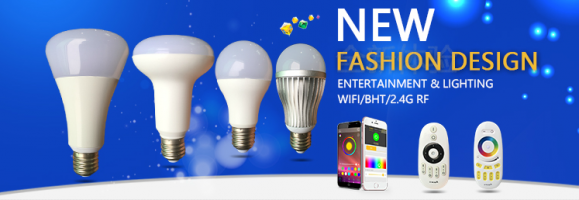
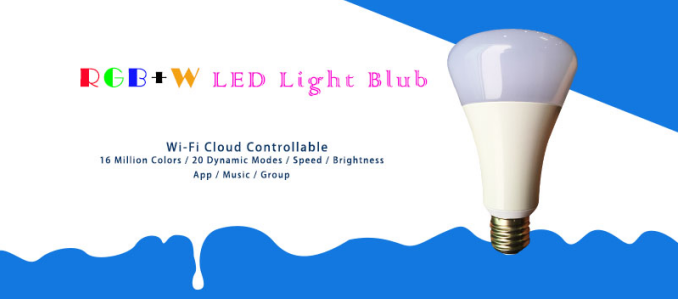
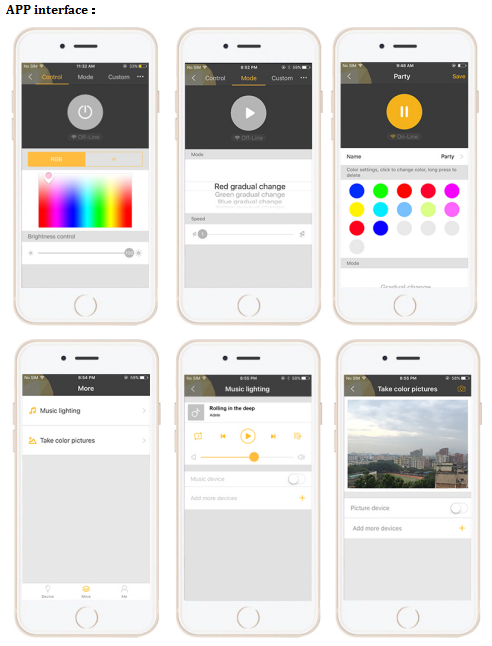
WiFi Led bulb is a new way to use your Smart lighting system。As a member of the jee-lite series, it is manipulated by connect to wireless router. Jee-lite is designed to make using your smart lighting system much easier and more convenient. No matter where you are, when it is, you can always control them. Functions like 16 million colors, 20 dynamic modes, music, and picture color recognize.
Product parameters:
● work temperature:-20-60℃
● input voltage:AC85-265V
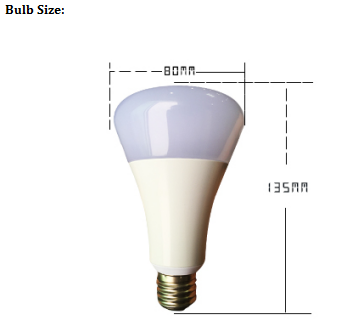
● Size:Φ80*135mm
● GW:200g
● Static power consumption:<1W
● power:9W
● Luminous flux: 810lumen (Warm white)
● Control distance:No limit
●W LED specifications: 2835(0.5W)
●RGB LED specifications: 5050(1.5W)
●Lamp Base: E27 E26 B22
●working life: 50000 hours
● Light emitting angle: 140°
●distance between controller and router:100 meters in open area(Depends on the wireless router's signal transmission distance)
Function:
Installation
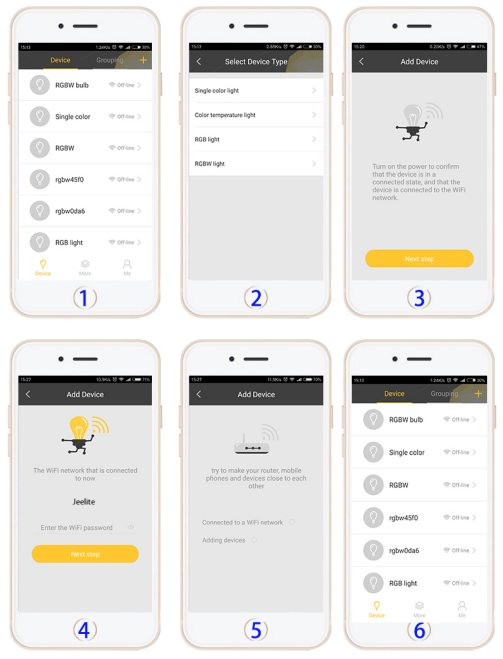
1. Search and download” smartlight” on App-store or google play.
2. Smartphone connects your Wi-Fi router; open our “JEE-lite” App, register an account and login.
3. Re-connect the device power 6 times, the light will flash.
4. Click on the top right Conner“+” to add the device, Select the device type of yours, then Click the “Next step”; enter the password of your Wi-Fi Router and “Next Step”.
5. The APP now paring your device to your router. About 5 seconds it will show you success.
6. Now you can control your device via internet, and you need to keep your Wi-Fi router online.
FAQ
(A) It is failed when I add new devices.
1.) Make sure you re-connect the device power 6 times continuously.
2.) Make sure you select the right device type.
3.) Make sure you enter the right password of your Wi-Fi router.
4.) Make sure your phone connected your Wi-Fi router.
5.) Make sure your Wi-Fi router can be connected more devices.
6.) Make sure your Wi-Fi router online.
(B) My phone can’t install JEE-lite APP.
JEE-lite support Android 4.4 or above; iOS 8.0 or above
(C) How many Wi-Fi devices can be controlled by one phone?
That depends on how many devices can be connected to your Wi-Fi router.
(D) Can I use many phones to control the Wi-Fi device?
Yes, but we suggest you use one account. (To avoid the chaos of lighting control)
(E) Why the lights can’t be changed immediately when I use the app?
It is cloud control, so the reaction depends on your internet speed.
(F) What if my phone with 4G/5G/other Wi-Fi, can I control it too?
Yes, when it is settled and your Wi-Fi router online, you can control it with 4G/5G/other Wi-Fi anywhere, anytime.
WiFi Led bulb is a new way to use your Smart lighting system。As a member of the jee-lite series, it is manipulated by connect to wireless router. Jee-lite is designed to make using your smart lighting system much easier and more convenient. No matter where you are, when it is, you can always control them. Functions like 16 million colors, 20 dynamic modes, music, and picture color recognize.
Product parameters:
● work temperature:-20-60℃
● input voltage:AC85-265V
● Size:Φ80*135mm
● GW:200g
● Static power consumption:<1W
● power:9W
● Luminous flux: 810lumen (Warm white)
● Control distance:No limit
●W LED specifications: 2835(0.5W)
●RGB LED specifications: 5050(1.5W)
●Lamp Base: E27 E26 B22
●working life: 50000 hours
● Light emitting angle: 140°
●distance between controller and router:100 meters in open area(Depends on the wireless router's signal transmission distance)
Function:
- WiFi Cloud control
- One by one or Group control.
- 16 million colors,100 levels brightness。
- 20dynamic modes,100levels speed。
- Music mode*! listen to your music through your microphone and change the lights to the beat!
- Picture color recognize, and change the lights color.
Installation
1. Search and download” smartlight” on App-store or google play.
2. Smartphone connects your Wi-Fi router; open our “JEE-lite” App, register an account and login.
3. Re-connect the device power 6 times, the light will flash.
4. Click on the top right Conner“+” to add the device, Select the device type of yours, then Click the “Next step”; enter the password of your Wi-Fi Router and “Next Step”.
5. The APP now paring your device to your router. About 5 seconds it will show you success.
6. Now you can control your device via internet, and you need to keep your Wi-Fi router online.
FAQ
(A) It is failed when I add new devices.
1.) Make sure you re-connect the device power 6 times continuously.
2.) Make sure you select the right device type.
3.) Make sure you enter the right password of your Wi-Fi router.
4.) Make sure your phone connected your Wi-Fi router.
5.) Make sure your Wi-Fi router can be connected more devices.
6.) Make sure your Wi-Fi router online.
(B) My phone can’t install JEE-lite APP.
JEE-lite support Android 4.4 or above; iOS 8.0 or above
(C) How many Wi-Fi devices can be controlled by one phone?
That depends on how many devices can be connected to your Wi-Fi router.
(D) Can I use many phones to control the Wi-Fi device?
Yes, but we suggest you use one account. (To avoid the chaos of lighting control)
(E) Why the lights can’t be changed immediately when I use the app?
It is cloud control, so the reaction depends on your internet speed.
(F) What if my phone with 4G/5G/other Wi-Fi, can I control it too?
Yes, when it is settled and your Wi-Fi router online, you can control it with 4G/5G/other Wi-Fi anywhere, anytime.
Friendship link